Blog
All Blog Posts | Next Post | Previous Post

 Turn Your Delphi Application into an MCP Server with TMS AI Studio
Today
The Model Context Protocol (MCP) is the standard way for LLM clients such as Claude, VS Code or n8n to call tools in other applications. In the previous posts of this series, AI Mail Desk fetched, classified, routed and answered customer mail. This post shows the step that makes all of that available to any LLM: the whole engine is an MCP server, built with TMS AI Studio.
Methods with Attributes Become Tools
TMS AI Studio's attribute-based server turns an ordinary Delphi class into an MCP server. Each method with [TTMSMCPTool] becomes a tool; parameter attributes provide the names and descriptions the LLM sees:
[TTMSMCPTool]
[TTMSMCPIdempotent]
[TTMSMCPName('reroute_mail')]
[TTMSMCPDescription('Move a mail to another department (and brand): the handler and the reply signature follow. ' +
  'Also triages a mail that was not triaged yet, with a template reply.')]
function RerouteMail(
  [TTMSMCPName('id')] AID: Integer;
  [TTMSMCPName('department')] const ADepartment: string;
  [TTMSMCPName('brand')][TTMSMCPOptional] const ABrand: string): string;
One call turns the object into a server, and prompts and resources are registered next to the tools:
Result := TTMSMCPServerFactory.CreateFromObject(ATools);
Result.ServerName := 'ai-mail-desk';
Result.Resources.RegisterDirectResource('routing', 'garage://routing',
  'Departments, brands and the handler routing rules', 'application/json',
  function(const URI: string): TTMSMCPResourceContent
  begin
    Result := TTMSMCPResourceContent.FromText(URI, 'application/json', ATools.RoutingResource);
  end);
Annotations tell the client which tools only look, which can safely be repeated and which reach the outside world, so a client can ask for confirmation where it matters:
Not Just Triage: Run and Maintain the System
AI Mail Desk does not expose a few convenience functions. The server owns everything, and every part of it is a tool: looking at the inbox, working it, and changing how the system works.
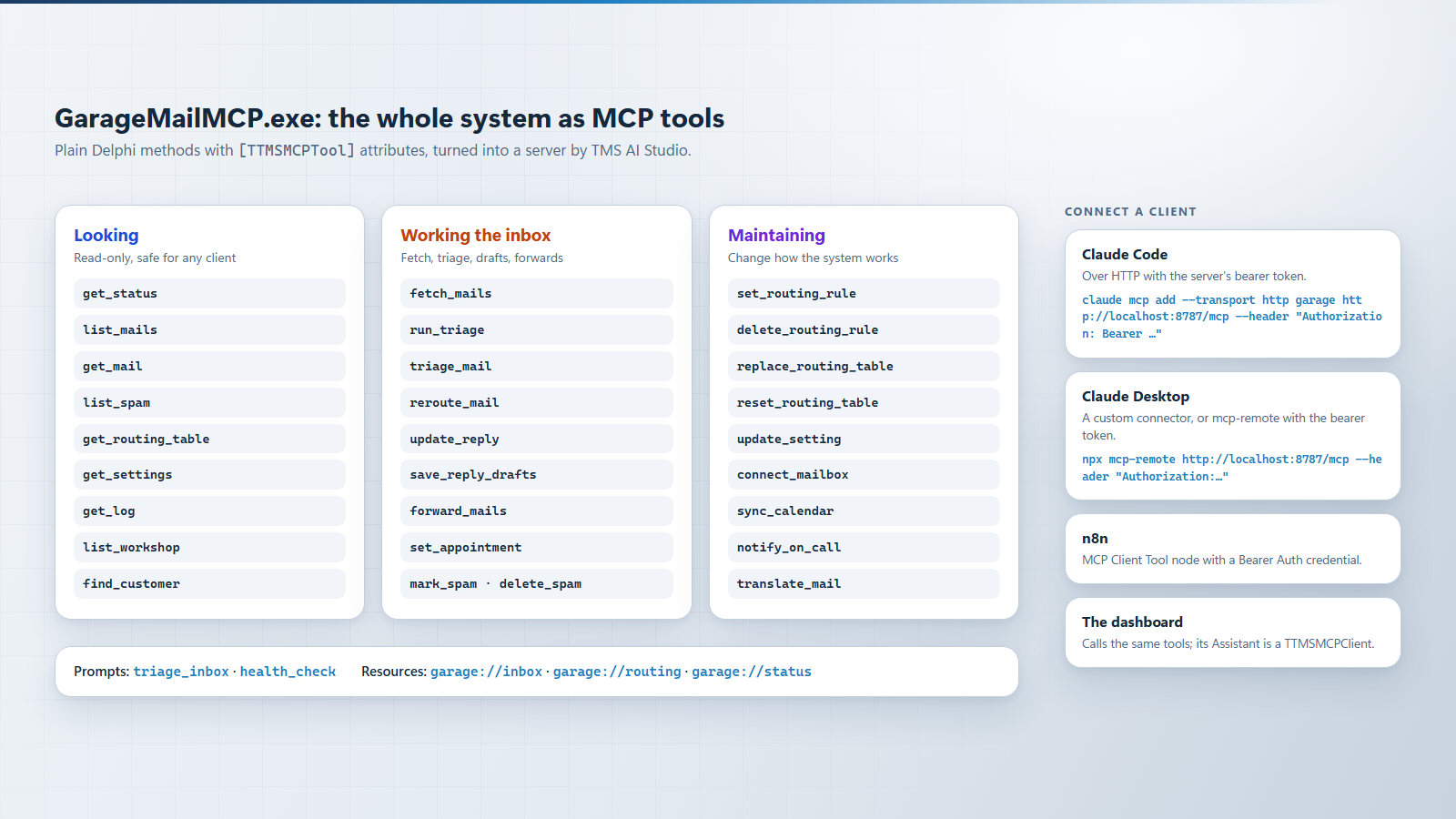
Read-only tools, tools that work the inbox and tools that maintain the system, plus two prompts and three resources.
That makes requests like these possible from any MCP client:
set_routing_rule call. Mails that are not forwarded yet are routed again.update_setting: service Claude, automation every 10 minutes.Two prompts guide a model through bigger jobs. triage_inbox walks through classifying, routing and preparing replies; health_check checks connections, errors, spam and routing, and only fixes things after you agree.
One Server over HTTP for Everyone
The server speaks Streamable HTTP, so a whole team, an automation platform or the dashboard can use one running instance. Every request needs a bearer token:
HTTP := TTMSMCPStreamableHTTPTransport.Create(HTTPServer, Port);
// Clients get a 401 with the protected-resource metadata (OAuth discovery)
// until they send "Authorization: Bearer <token>"
HTTP.RequireBearerAuthentication := True;
HTTP.OnValidateAccessToken := Tools.ValidateToken;
HTTPServer.Transport := HTTP;
HTTPServer.Start;
On first start the server generates a random token. Without a valid token it answers with 401 and points to its OAuth protected-resource metadata, which is how MCP clients find out where to get a token. To use Entra ID, Google or Auth0 instead of a shared token, you validate the JWT in OnValidateAccessToken.
Every client connects to the same running server, so Claude, the dashboard and the rest of the team always see the same inbox. Claude Desktop adds it as a custom connector, or through mcp-remote with the bearer token. Adding it to Claude Code is one command:
claude mcp add --transport http garage http://localhost:8787/mcp --header "Authorization: Bearer <token>"
In n8n you use the MCP Client Tool node with the same URL and a Bearer Auth credential.
Threads: Where the Tools Run
The HTTP transport answers each request on its own thread, while the Cloud Pack components and TTMSMCPCloudAI deliver their results on the main thread. The demo keeps the engine on the main thread, which pumps CheckSynchronize, and lets each tool reach the engine with TThread.Synchronize:
function TGarageMailTools.OnMain(const AFunc: TFunc<string>): string;
var
  R: string;
begin
  if TThread.Current.ThreadID = MainThreadID then
    Exit(AFunc());
  TThread.Synchronize(nil,
    procedure
    begin
      R := AFunc();
    end);
  Result := R;
end;
A tool that has to wait for a mailbox or an AI answer waits on its own request thread, so other clients, including the dashboard, keep being served in the meantime.
The Dashboard Is Just Another Client
The FireMonkey dashboard holds no state of its own. It calls the same tools over HTTP and polls get_dashboard_state for changes, so clicking Triage with AI is one tool call:
Dashboard.Client.Call('run_triage', nil,
  procedure(AResult: TJSONValue; const AError: string)
  begin
    if AError <> '' then
      Dashboard.Log('Triage: ' + AError);
  end);
That is why a routing change made by Claude appears in the dashboard within a second: both are looking at the same server.
Good to Know
"Exposing an application to LLMs is mostly a matter of adding attributes to methods you already have."
Conclusion
With TMS AI Studio, exposing an application to LLMs is mostly a matter of adding attributes to methods you already have. AI Mail Desk takes it all the way: every action and every setting is a tool, so the same system can be run by people, by Claude, by n8n or by its own automation. In the next post we look at the other side of MCP: a client inside the dashboard that gives the team its own assistant.
MCPServer\uMailTools.pas.TMS AI Studio is the complete toolkit for bringing AI and the Model Context Protocol to your Delphi applications. Build MCP servers and clients, connect Claude and other assistants to your own tools and data, and add cloud AI to your VCL and FMX apps, all in native Delphi. Discover TMS AI Studio.
Bradley Velghe
Related Blog Posts
-
Building an AI Mail Desk for a Car Dealership with Delphi
-
Classify and Route Customer Mail with AI in Delphi
-
AI That Reads Attachments, Remembers Customers and Catches Spam
-
Turn Your Delphi Application into an MCP Server with TMS AI Studio

This blog post has not received any comments yet.
All Blog Posts | Next Post | Previous Post