Blog
All Blog Posts | Next Post | Previous Post

 AI That Reads Attachments, Remembers Customers and Catches Spam
Today
In part 1 the AI classified a mail from its text alone. Real customer mail carries more: a photo of a warning light, an invoice PDF, a history with the dealership, and in between it all, mail that should never reach a person. This post adds those three layers to the triage of AI Mail Desk, without adding a second AI request.
Photos and PDFs Go Along with the Mail
When TMS FNC Cloud Pack fetches a mail, the server downloads image and PDF attachments right away: Gmail through GetAttachment and OnGetAttachment, Outlook through GetAttachments and OnGetAttachments. Each file is saved next to the server's data and its path is stored on the mail.
At triage time, TTMSMCPCloudAI sends those files with the request. AI Studio picks the right file type from the extension:
FAI.Context.Text := BuildMailPrompt(M);
// Photos and PDFs travel with the request; the model describes them in "attachments"
FAI.ClearFiles;
for Path in M.Attachments do
  if TFile.Exists(Path) then
    FAI.AddFile(Path, FileExtToFileType(Path));
FAI.Execute(M.ID.ToString);
The prompt asks the model to describe what matters for the handler in an attachments field: the warning lights on a dashboard photo, visible damage, or the number, date and amount on an invoice. The model also uses what it sees for the classification itself. A short "my car broke down" with a photo of a red engine warning becomes a confident, urgent maintenance mail.
In the demo inbox, Ellen De Smet's breakdown mail carries a dashboard photo and Nathalie Maes' complaint about a double charge carries the invoice as a PDF, so you can try this with any vision-capable model.
A Customer Memory in SQLite
Every triaged mail is stored in a small SQLite database through FireDAC: who wrote, when, which department, which handler and the one-line summary. When a new mail arrives from a known address, the last few contacts are added to the prompt as Earlier contact, and the AI is told to take them into account. A follow-up on last month's repair is then recognised as a follow-up, not as a new request.
The history also changes the routing. A returning customer goes back to the person who handled their last mail in the same department, as long as that person is still in the routing table:
FQuery.Open('SELECT handler_email, received FROM history WHERE lower(email) = lower(:e) ' +
  'AND department = :d AND source_id <> :s ORDER BY received DESC LIMIT 1',
  [AMail.FromEmail, Ord(AMail.Department), HistoryKey(AMail)]);
If that handler still owns the department, the mail is routed to them and the reason says why. In the demo, Pieter Jacobs asks for a test drive in an Audi Q6 e-tron. The routing table would send that to the Audi salesperson, but Pieter received a quote from Lukas Peeters a month earlier, so the mail stays with Lukas:
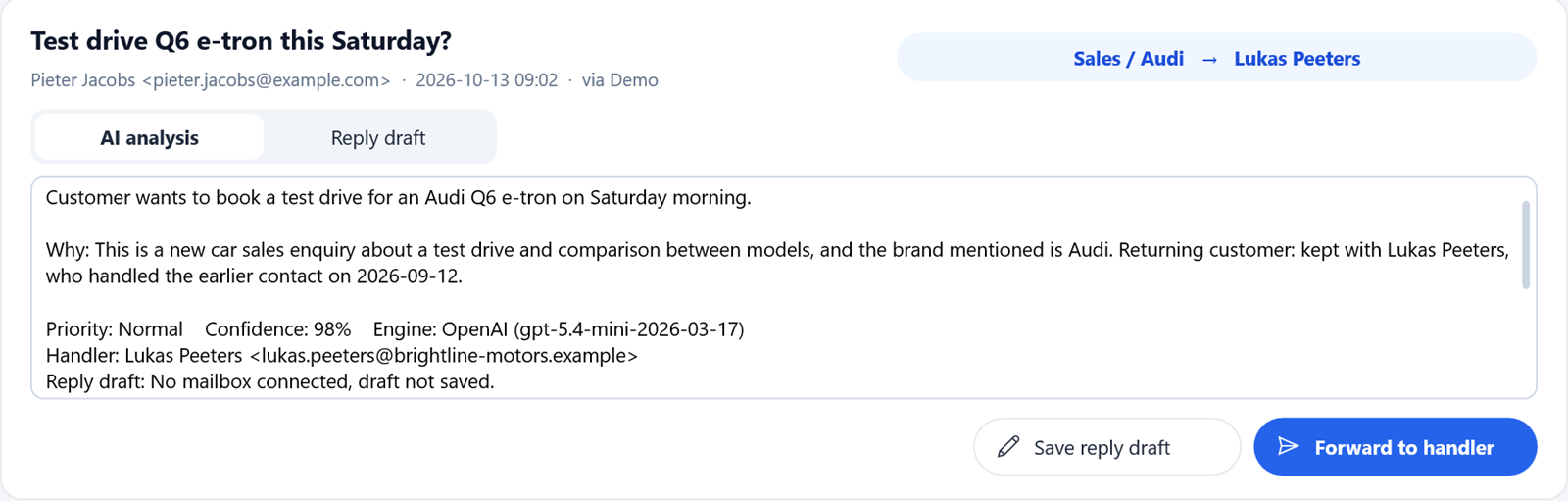
A returning customer keeps their contact person: "Returning customer: kept with Lukas Peeters".
The same history is available as an MCP tool, find_customer, so an LLM working the inbox can look up a customer before it answers a question about them.
Spam in the Same Request
A dealership address attracts prize scams, crypto offers and cold sales pitches for search engine optimisation. Rather than a separate filter, the triage asks for two more fields in the same JSON answer: "spam" and "spam_reason". The prompt is explicit about what does not count as spam: a real customer, supplier or job applicant never is, even when the mail is short or rude.
Spam leaves the inbox and waits on its own page, with the reason and a preview. The count shows in the sidebar.
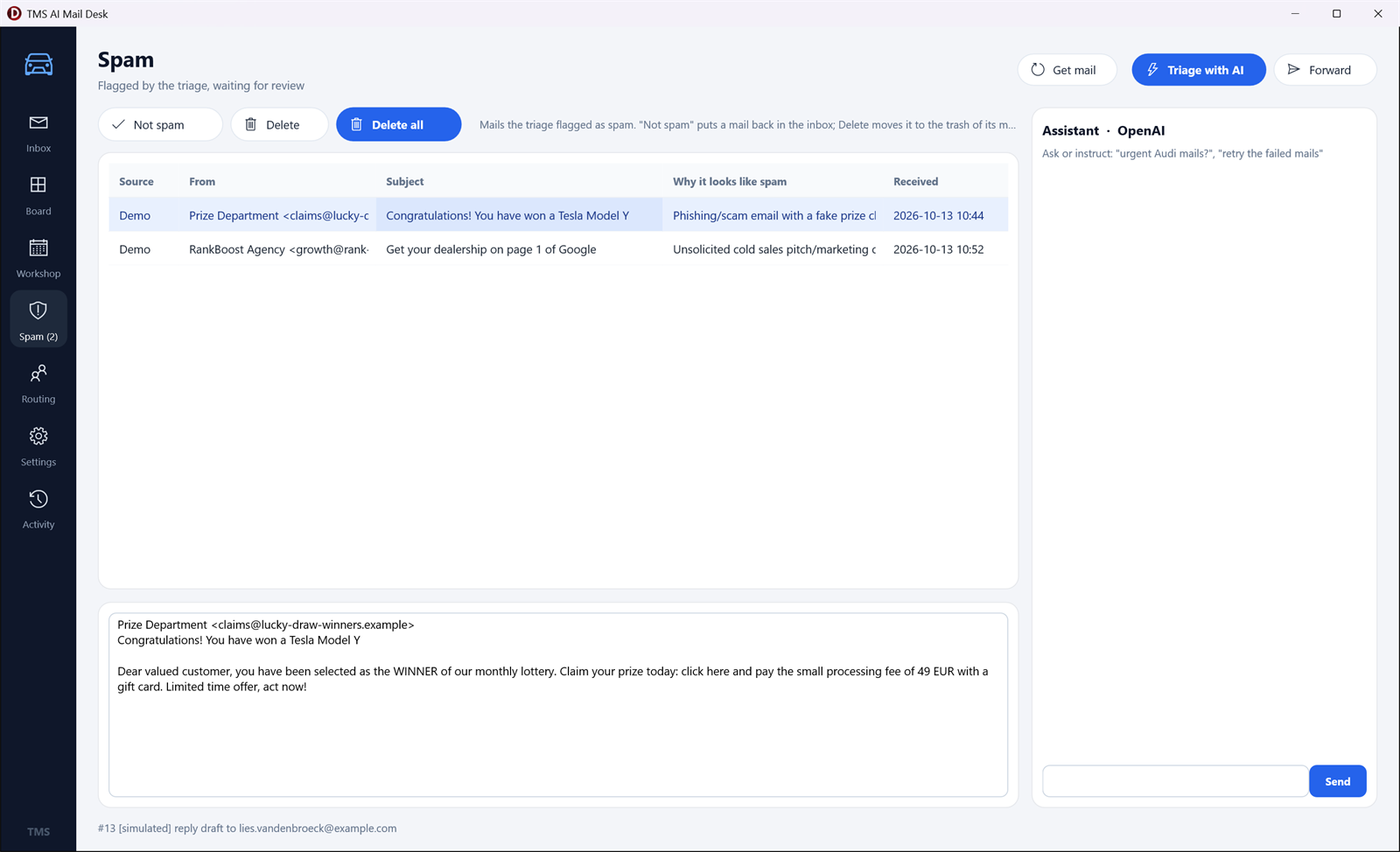
Flagged mails wait for review. Not spam puts a mail back in the inbox; Delete moves it to the mailbox's trash.
Two details keep the filter safe:
Without an AI service, an offline check flags a mail when it contains two or more typical scam or cold-pitch phrases, matched as whole words so that "seo" does not match "Seoul".
"None of these additions needs a second model call."
Conclusion
None of these additions needs a second model call. The attachments ride along with AddFile, the history is a few lines of SQL and a paragraph in the prompt, and spam detection is two extra fields in the JSON the AI already returns. The result is a triage that sees what the customer sent, knows who they are and keeps the junk away from the team. In the next post, the triaged mail turns into action: drafts, forwards, workshop slots, alerts and translations.
MCPServer\uTriageEngine.pas.TMS AI Studio is the complete toolkit for bringing AI and the Model Context Protocol to your Delphi applications. Build MCP servers and clients, connect Claude and other assistants to your own tools and data, and add cloud AI to your VCL and FMX apps, all in native Delphi. Discover TMS AI Studio.
TMS FNC Cloud Pack connects your Delphi applications to cloud services such as Gmail, Outlook, Google Calendar, Outlook Calendar, Pushover and many more, with the OAuth sign-in handled for you. Discover TMS FNC Cloud Pack.
Bradley Velghe
Related Blog Posts
-
Building an AI Mail Desk for a Car Dealership with Delphi
-
Classify and Route Customer Mail with AI in Delphi
-
AI That Reads Attachments, Remembers Customers and Catches Spam

This blog post has not received any comments yet.
All Blog Posts | Next Post | Previous Post