Blog
All Blog Posts | Next Post | Previous Post

 Introducing the DB-aware TWebDataGrid
Wednesday, May 6, 2026

We are thrilled to announce the beta release of TMS WEB Core v3.0.
This new version marks another important step forward in our mission to bring RAD-style Delphi web development to modern browser applications. With TMS WEB Core, Delphi developers can build rich client-side web applications in Object Pascal, using familiar tools, components and development patterns.
One of the major new features in TMS WEB Core v3.0 is the introduction of a DB-aware version of TWebDataGrid: TWebDBDataGrid.
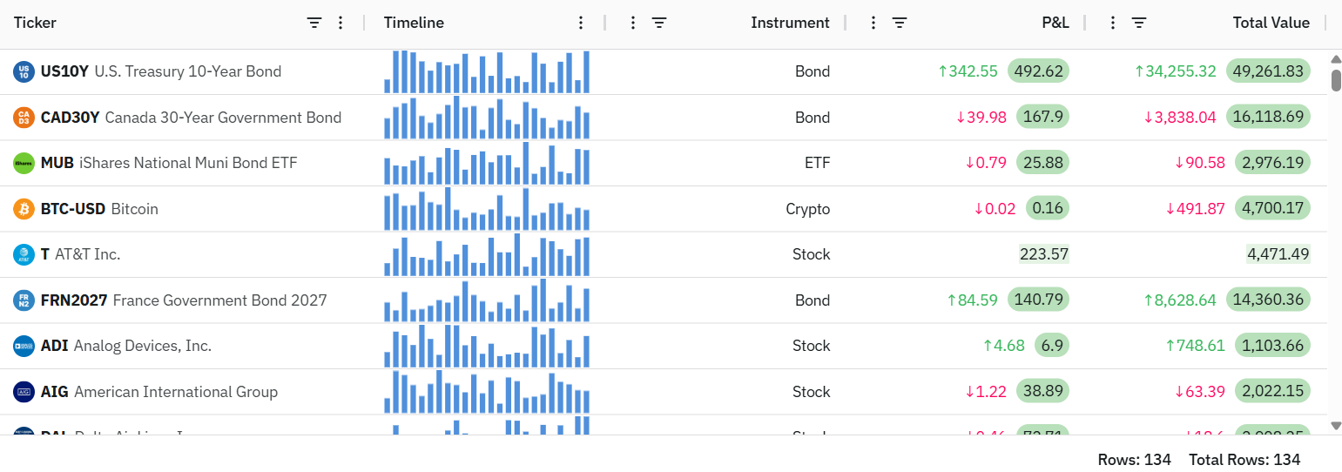
Why TWebDBDataGrid?
When building business applications, data is almost always at the center of the application. Whether it is customer data, orders, invoices, products, planning information or analytics, developers need a powerful way to present and manipulate structured data.
With TWebDataGrid, TMS WEB Core already offers a modern, high-performance grid component based on the popular MIT licensed AgGrid technology. It brings powerful grid functionality to web client applications, including sorting, filtering, formatting and advanced visualization capabilities.
But for Delphi developers, there is one development model that remains extremely productive and familiar: the TDataSource / TDataSet paradigm.
That is exactly where TWebDBDataGrid comes in.
It brings the power of TWebDataGrid together with the familiar Delphi database-aware architecture. This means that web client applications can now bind grid data directly to datasets using the same conceptual model Delphi developers have been using for decades in VCL and FMX applications.
Delphi-style databinding for web client applications
The new TWebDBDataGrid uses the standard Delphi-style databinding approach:
WebDBDataGrid1.DataSource := WebDataSource1;
WebDataSource1.DataSet := WebClientDataSet1;
That is all it takes to connect the grid to a dataset.
From there, the grid can automatically display the data from the dataset and provide rich interaction capabilities out of the box.
This makes it possible to work with data in a very natural Delphi way, also in a browser-based TMS WEB Core application.
The TWebDBDataGrid can connect to datasets such as:
TWebClientDataSet
TXDataDataSet
TStellarDataStoreClientDataSet
and other dataset-based data sources.
This opens the door to directly working with data coming from a backend database through TMS WEB Core client-side applications. Whether the data is local in a client dataset, retrieved from a TMS XData backend, or provided by StellarDS.io, the grid can consume it through the familiar dataset abstraction.
Less glue code, more productivity
One of the main goals behind TWebDBDataGrid is simple: reduce the amount of code needed to build data-driven web applications.
Without DB-aware binding, developers often need to manually transfer data from backend responses into grid structures, handle updates, synchronize records, process sorting or filtering, and keep UI state aligned with data state.
With TWebDBDataGrid, much of this becomes automatic.
The component provides out-of-the-box support for:
- displaying dataset records
- editing data
- sorting
- formatting
- paging
- filtering
This means developers can focus more on the application logic and less on the repetitive wiring between data and UI.
Example: connecting a dataset to the grid
A typical setup can be as compact as this:
procedure TForm1.WebFormCreate(Sender: TObject);
begin
  WebDataSource1.DataSet := WebClientDataSet1;
  WebDBDataGrid1.DataSource := WebDataSource1;
  WebClientDataSet1.Open;
end;
The grid automatically receives its data through the datasource.
When working with a backend dataset like TMS XData dataset, the same concept applies:
procedure TForm1.WebFormCreate(Sender: TObject);
begin
  WebDataSource1.DataSet := XDataDataSet1;
  WebDBDataGrid1.DataSource := WebDataSource1;
  XDataDataSet1.Open;
end;
And when using StellarDS.io, our data in the cloud as a service solution:
procedure TForm1.WebFormCreate(Sender: TObject);
begin
  WebDataSource1.DataSet := StellarDataStoreClientDataSet1;
  WebDBDataGrid1.DataSource := WebDataSource1;
  StellarDataStoreClientDataSet1.Open;
end;
The dataset can represent data coming from a real backend database, while the web client application continues to work with a clean Delphi dataset model.
Editing data in the browser
TWebDBDataGrid is not limited to displaying data. It also supports editing with various inplace editor types, making it possible to build real data management screens directly in the browser.
For example, a typical edit flow can remain dataset-driven:
procedure TForm1.btnSaveClick(Sender: TObject);
begin
  if WebDataSource1.DataSet.State in dsEditModes then
    WebDataSource1.DataSet.Post;
end;

procedure TForm1.btnCancelClick(Sender: TObject);
begin
  if WebDataSource1.DataSet.State in dsEditModes then
    WebDataSource1.DataSet.Cancel;
end;
This is the kind of code Delphi developers already know.
The advantage is that the same productive programming model now becomes available in modern web client applications created with TMS WEB Core.
A natural fit for database-backed web applications
The addition of TWebDBDataGrid is especially useful for applications that need to work directly with structured backend data.
Typical use cases include:
- admin dashboards
- ERP-style browser applications
- customer portals
- order management systems
- reporting screens
- planning tools
- database maintenance applications
Combined with datasets such as TXDataDataSet and TStellarDataStoreClientDataSet, TWebDBDataGrid makes it easier to build full client-side web applications that interact with backend databases in a structured and maintainable way.
The result is a productive development experience where the backend, dataset layer and grid UI work together with minimal boilerplate code.
Built-in power of TWebDataGrid
Because TWebDBDataGrid is based on the TWebDataGrid technology, it benefits from the rich grid functionality already available in TMS WEB Core.
This includes advanced grid behavior such as:
- column formatting
- sorting
- filtering
- paging & continuous data loading during scroll
- editing with multiple editor types
- custom cell content
- responsive browser rendering
- large data presentation
This makes TWebDBDataGrid not just a DB-aware grid, but a powerful modern web grid with Delphi-style databinding.
Conclusion
With TMS WEB Core v3.0, we are taking another step in making web development with Delphi more powerful, more productive and more familiar.
The new TWebDBDataGrid brings the well-known TDataSource / TDataSet paradigm to a modern browser grid component. It enables developers to connect directly to datasets such as TWebClientDataSet, TXDataDataSet, TStellarDataStoreDataSet and others, while benefiting from built-in editing, sorting, formatting, paging and filtering.
For Delphi developers building database-oriented web applications, this means less code, faster development and a much more natural development experience.
Beta available now

The TMS WEB Core v3.0 beta is available now for all TMS ALL-ACCESS users and can be downloaded from the My Products page after login on our website!
Through live demos, the video highlights the strengths of each option and clarifies where the WebDataGrid and its DB-aware counterpart fit within your web UI toolkit.
Introducing the TMS WEB Core WebDataGrid Video Series
To help you get the most out of the new TWebDataGrid, we’re launching a dedicated video series featuring Bruno Fierens. In this series, Bruno walks you through the capabilities of the WebDataGrid, sharing practical insights and hands-on demonstrations to accelerate your development.
A new video will be released every Thursday over the coming weeks, gradually guiding you from the fundamentals to more advanced data handling techniques in modern web applications.
WebDataGrid #1: Managing Tabular Data in Delphi Web Applications
In the first episode, we explore the different approaches to displaying and managing tabular data in TMS WEB Core applications. You’ll discover how components like TWebStringGrid, TWebDBGrid, TWebTableControl, TWebDBTableControl, FNC Data Grid, TWebDataGrid, and TWebDBDataGrid compare in terms of features, rendering, and styling.Through live demos, the video highlights the strengths of each option and clarifies where the WebDataGrid and its DB-aware counterpart fit within your web UI toolkit.
Stay tuned for the next episodes in this series.
Get 10% Off TMS WEB Core & TMS FNC UI Pack
Enjoy 10% off when purchasing a new license of TMS WEB Core or TMS FNC UI Pack. Simply use the promo code WEBDATAGRID10 at checkout.
Offer valid until June 18, 2026
Bruno Fierens
Related Blog Posts

This blog post has received 1 comment.
All Blog Posts | Next Post | Previous Post
We''ll implement it in our applications right away; it''s the most natural way to port from VCL to the web.
Dbgrids are essential for maintaining the Delphi "standard" on the web. I''m just asking you to also produce a Lookup (DbLookup) that includes the TwebDatagrid in the popup with all the features, and that allows incremental search during input. Lookups on large tables are a thorny issue in the web world, and by doing so, we''ll solve all the porting problems by creating professional web applications.
Stefano Monterisi