Blog
All Blog Posts | Next Post | Previous Post

 TMS VCL UI Pack 13.8: Taking Native PDF Handling to the Next Level!
Today
With the release of TMS VCL UI Pack v13.8, we are taking another important step forward in bringing powerful document processing capabilities to Delphi & C++Builder developers!
While TMS VCL UI Pack is best known for its extensive collection of over 600 components for building feature-rich Windows applications, it also includes powerful libraries for working with PDF documents, graphics, SVG images and much more.
In this new release, we have significantly extended the native PDF handling capabilities, allowing developers to go well beyond PDF generation. You can now open, inspect, edit, merge, rotate and save existing PDF documents, all directly from your Delphi or C++Builder application!
And that's not all. We have also extended our SVG rendering engine with improved support for complex SVG paths and clipping rules.
Let's have a closer look!
From PDF Generation to PDF Manipulation
Over the years, the PDF capabilities in TMS VCL UI Pack have steadily evolved.
With TMS VCL UI Pack v13.6, we introduced PDF form field generation in TAdvPDFLib, making it possible to generate interactive PDF documents containing:
Text edit and memo fields
Password fields
Combo boxes and list boxes
Checkboxes
Grouped radio buttons
This was an important step beyond generating static PDF documents. Developers could now create interactive forms that users could fill in using their preferred PDF viewer.
With v13.8, we take the next logical step: working with existing PDF documents!
Instead of only generating a PDF from scratch, applications can now open an existing document, inspect its contents, reorganize pages, add new content and save the modified result.
This opens up a whole range of new possibilities for document processing in business applications.
Open, Edit, Merge and Save Existing PDF Documents
Consider a typical business application that generates invoices, reports or contracts.
Very often, generating the document is only the beginning of the workflow. Documents might need to be combined with additional pages, stamped with an approval, rotated, or enriched with additional information before being distributed or archived.
With the new PDF manipulation capabilities in TAdvPDFLib, these operations can now be performed directly from Delphi code.
The new functionality includes:
Open existing PDFs: Load and inspect PDF documents.
Merge documents: Combine multiple PDF files into a single document.
Reorganize pages: Move, duplicate or remove pages.
Rotate pages: Correct page orientation in 90-degree steps.
Edit existing pages: Add new graphical content, text or annotations through the PDF graphics API.
Save modified PDFs: Write the resulting document to a new PDF file.
For example, a typical document assembly workflow could look like this:
AdvPDFLib1.OpenDocument('report.pdf');
try
  // Rotate the first page
  AdvPDFLib1.RotatePage(0, 90);

  // Duplicate the second page
  AdvPDFLib1.DuplicatePage(1);

  // Append another PDF document
  AdvPDFLib1.MergeDocument('appendix.pdf');

  // Save the resulting document
  AdvPDFLib1.SaveDocument('completed-report.pdf');
finally
  AdvPDFLib1.CloseDocument;
end;
Notice how straightforward the API is!
There is no need to launch an external PDF application or convert the original document into a series of images. The original PDF page content, including fonts and images, is preserved during these structural operations.
This is particularly useful for applications dealing with invoices, contracts, technical documentation, customer reports or document archiving.
Add Content to Existing PDF Pages
Another interesting new capability is the possibility to add content to an existing PDF page.
Imagine an application where a document needs to be stamped with an approval status, a customer reference or additional information.
The new page editing functionality allows developers to draw on existing PDF pages using the familiar graphics API.
For example:
AdvPDFLib1.OpenDocument('invoice.pdf');
try
  AdvPDFLib1.BeginPageEdit(0, pelOverlay);
  try
    AdvPDFLib1.Graphics.Font.Size := 22;
    AdvPDFLib1.Graphics.Font.Color := gcRed;

    AdvPDFLib1.Graphics.DrawText(
      'APPROVED',
      PointF(36, 48)
    );
  finally
    AdvPDFLib1.EndPageEdit;
  end;

  AdvPDFLib1.SaveDocument('approved-invoice.pdf');
finally
  AdvPDFLib1.CloseDocument;
end;
The example adds an approval stamp on top of the existing first page.
In addition to overlays, the PDF library supports underlays, allowing content to be drawn behind the original page content.
This makes it possible to implement document workflows such as adding watermarks, company branding, page numbers, footers or other graphical elements without having to recreate the original document.
PDF Metadata, Links and Unicode Text Extraction
PDF files are more than just collections of pages containing text and graphics.
They also contain valuable information that applications may need to inspect, extract or update.
TMS VCL UI Pack v13.8 therefore also introduces extended support for PDF metadata, links and Unicode text extraction.
Working with PDF Metadata
Applications can now access and modify common PDF document properties, including:
Title
Author
Subject
Keywords
Creator and producer information
Document dates
For example, updating document properties becomes as simple as:
AdvPDFLib1.OpenDocument('document.pdf');
try
  AdvPDFLib1.Title := 'Customer Report';
  AdvPDFLib1.Subject := 'Final approved version';

  AdvPDFLib1.SaveDocument('final-report.pdf');
finally
  AdvPDFLib1.CloseDocument;
end;
This is useful for document management systems, archiving applications and automated document processing.
Unicode Text Extraction
Another major addition is the ability to extract text from existing PDF pages.
AdvPDFLib1.OpenDocument('document.pdf');
try
  Memo1.Lines.Text :=
    AdvPDFLib1.GetDocumentPageText(0);
finally
  AdvPDFLib1.CloseDocument;
end;
The PDF library handles common PDF font encodings and Unicode text mappings, allowing applications to retrieve readable text from supported PDF documents.
This is especially valuable when implementing features such as document searching, indexing, content analysis or automatic classification.
Text extraction can also be combined with other application logic, including AI-powered document analysis, where extracted PDF content can be passed to an AI service for further processing.
Support for PDF links adds another dimension, enabling applications to work with hyperlinks as part of their PDF document workflows.
Together, these extensions make the PDF library a much more versatile tool for developers who need to process documents rather than simply generate them.
Improved SVG Rendering: Fill-Rule and Clip-Rule Support
PDF handling is not the only area receiving important improvements in v13.8!
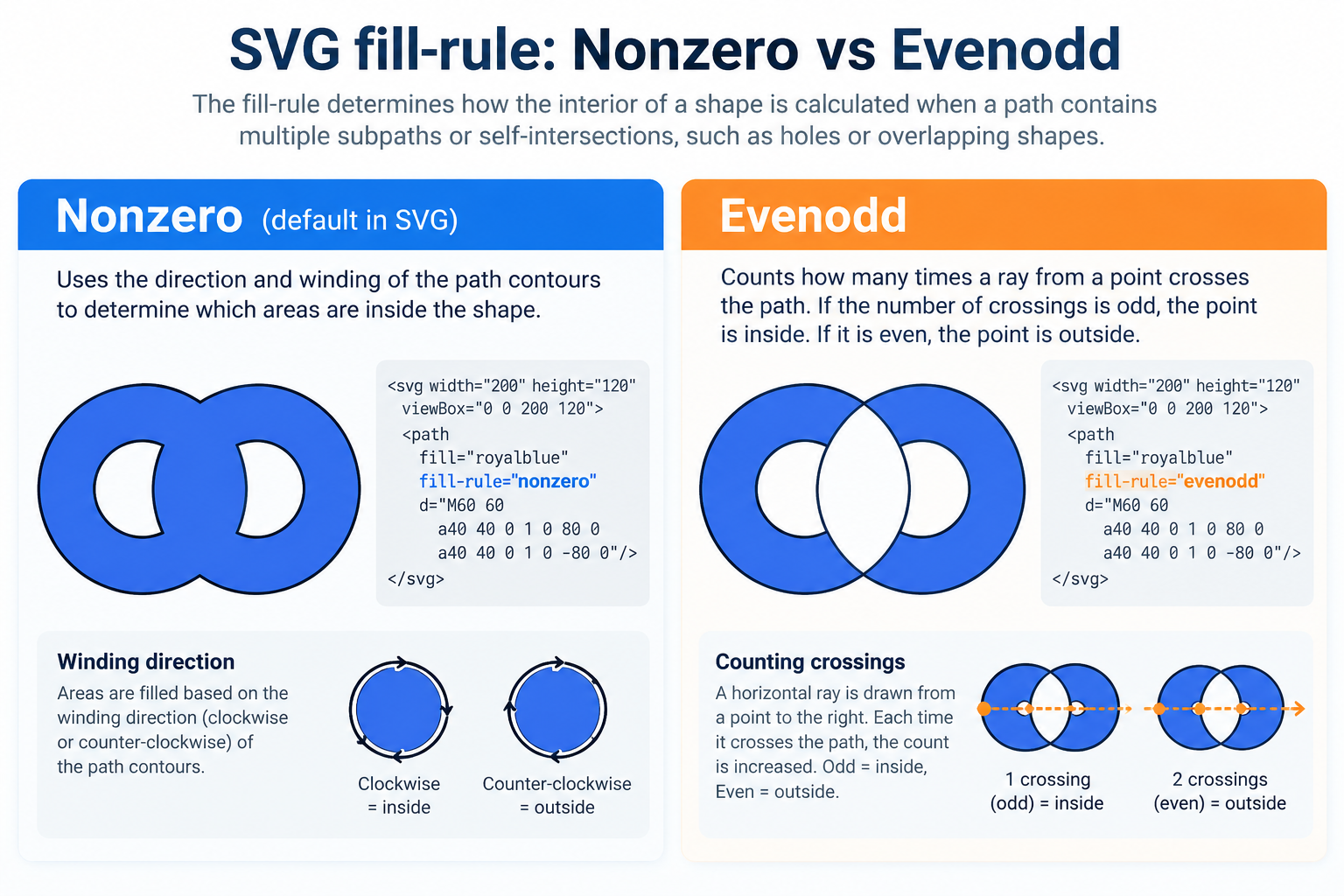
Our SVG rendering engine has also been extended with support for the SVG fill-rule and clip-rule properties, including both nonzero and evenodd rules.
Why is this important?
SVG graphics can contain complex shapes composed of multiple paths, overlapping contours and cutouts.
How these shapes are filled or clipped depends on the rules specified in the SVG document.
Understanding Nonzero and Evenodd
The two supported filling rules determine whether a point inside a complex path should be filled.
Nonzero uses the direction and winding of the path contours to determine which areas are inside the shape.
Evenodd counts how many times a path crosses a line extending from a point. If the number of crossings is odd, the point is considered inside the shape. If it is even, the point is outside.
For example, consider this SVG path:
<svg xmlns="http://www.w3.org/2000/svg"
     width="200" height="200"
     viewBox="0 0 200 200">

  <path
    fill="royalblue"
    fill-rule="evenodd"
    d="M10 10 H190 V190 H10 Z
       M60 60 H140 V140 H60 Z"/>
</svg>
With the evenodd rule, the inner rectangle becomes a transparent cutout.
With the nonzero rule, the result depends on the direction in which the contours are defined.
Or with this visual presentation, it should be even easier to understand:
The same principles apply to clipping paths using clip-rule.
This is particularly relevant when rendering SVG files originating from vector design applications, icon libraries or other SVG authoring tools.
By correctly supporting these rules, the TMS SVG rendering engine can handle more complex vector artwork with greater fidelity to the original design.
For developers using SVG icons, illustrations or vector graphics in their VCL applications, this means more accurate rendering without having to modify or simplify the original SVG files.
Why Native PDF Handling Matters
One of the important advantages of the PDF library included in TMS VCL UI Pack is that these capabilities are available directly inside your Delphi or C++Builder application.
For many business applications, PDF processing is an integral part of the workflow.
Think of scenarios such as:
Automatically assembling monthly reports from multiple PDF documents.
Adding approval stamps to incoming invoices.
Extracting text from documents for indexing or searching.
Generating interactive customer forms.
Combining contracts with appendices.
Adding document metadata before archiving.
Correcting page orientation in received documents.
All these operations can now be handled with the PDF functionality included in TMS VCL UI Pack, without requiring a separate external PDF application.
And with the PDF form generation capabilities introduced in v13.6, developers have an increasingly complete set of tools to create and manipulate PDF documents.
VCL or Cross-Framework? We Have You Covered!
Of course, not every Delphi application targets Windows exclusively.
For developers building traditional Windows desktop applications with VCL, TMS VCL UI Pack offers an excellent combination of an extensive UI component collection and increasingly powerful native PDF handling capabilities.
The new PDF manipulation functionality in v13.8 makes this already feature-rich product even more valuable.
But what if you want to use similar PDF processing capabilities in FireMonkey applications, on macOS, iOS or Android, or even in web applications created with TMS WEB Core?
This is where TMS FNC Core comes in!
With the recently released TMS FNC Core 4.5, the TMS FNC PDF Library offers a powerful PDF generation and manipulation engine built on the cross-framework FNC architecture.
As explained in our recent blog article, Transform PDFs with TMS FNC Core 4.5, it offers capabilities for opening, editing, merging, rotating, inspecting and saving PDF documents.
The advantage of the FNC architecture is that the same code and concepts can be used across multiple frameworks and operating systems.
This includes VCL, FireMonkey and TMS WEB Core, targeting Windows, macOS, Linux, iOS, Android and the browser as supported by the respective Delphi frameworks.
So whether your application is a traditional Windows desktop application or a cross-platform solution, TMS Software has you covered!
Conclusion
With TMS VCL UI Pack v13.8, we continue our long tradition of extending and improving the tools available to Delphi & C++Builder developers.
The new native PDF manipulation functionality is a significant addition, building further on the PDF form generation capabilities introduced in v13.6.
Together with the improvements in SVG rendering, this release brings even more possibilities to developers building modern, feature-rich Windows applications.
For VCL developers, TMS VCL UI Pack v13.8 brings powerful new native PDF generation and manipulation capabilities right into their existing development environment.
For developers looking for a cross-framework solution that can be used across the operating systems supported by Delphi, TMS FNC Core is an excellent choice.
Existing customers can simply use the TMS Smart Setup update command to get the update up & running in less than a minute.
Not using TMS VCL UI Pack yet? Discover what our extensive collection of over 600 components can bring to your next Delphi or C++Builder application with our fully functional, non-time-limited trial version!
Happy coding!
Bruno Fierens

This blog post has not received any comments yet.
All Blog Posts | Next Post | Previous Post