Blog
All Blog Posts | Next Post | Previous Post

 A technical look at the TMS AI City Guide summer project
Thursday, August 13, 2026

The TMS AI City Guide project is a Delphi FireMonkey application that combines interactive maps, AI-generated points of interest, GPX route export, and AI-generated speech. It demonstrates a useful pattern for cross-platform Delphi development: keep the application logic platform-independent and isolate native functionality behind small wrapper units.
The project targets Android, iOS, Windows and MacOS. The main application is defined in TMSCityGuide.dpr, while the UI logic is separated into UILogic.pas. Two particularly reusable examples are the file share functionality in uShareFile.pas and MP3 playback in uMP3Play.pas.
Exporting a GPX file through the device share sheet
The map component can export the current route, including its waypoints, to a GPX file using SaveToGPXFile. The resulting file can then be passed to other applications such as mapping, navigation, fitness, or file-management apps.
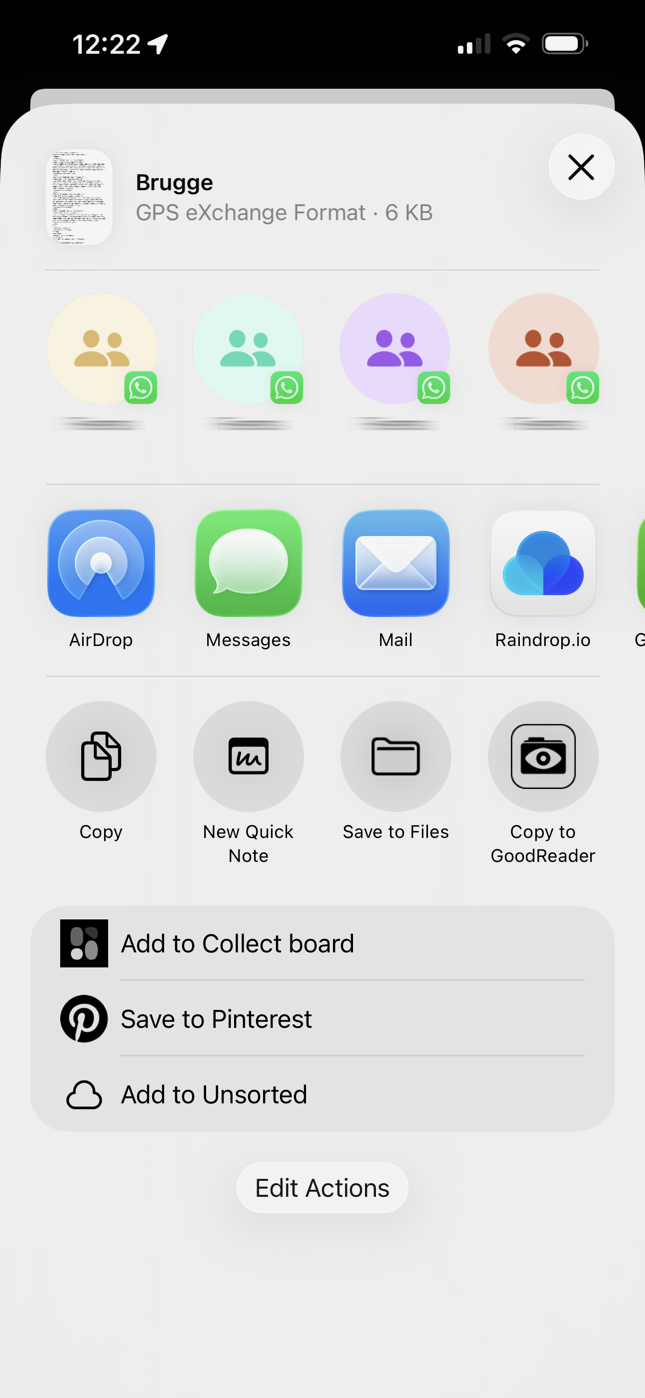
The form code first creates a temporary filename, exports the route, and calls one platform-independent procedure:
procedure TCityGuide.BtnShareClick(Sender: TObject);
var
  LFileName: string;
  FName: string;
begin
  if UILogic.City <> '' then
    FName := UILogic.City + '.gpx'
  else
    FName := 'mycitytour.gpx';

  LFileName := TPath.Combine(
    TPath.GetTempPath,
    TPath.GetFileName(FName)
  );

  UILogic.ExportToGPX(TMSFNCMaps, LFileName);

  ShareFile(LFileName, 'application/xml', FName);
end;
The important design decision is that the form does not contain Android or iOS code. It only knows that ShareFile accepts a filename, MIME type, and title.
Android implementation
On Android, ShareFile creates an ACTION_SEND intent. The file is exposed through an AndroidX FileProvider, which produces a secure content URI. The URI is attached to the intent as EXTRA_STREAM, and read permission is granted to the receiving application.
LIntent := TJIntent.Create;
LIntent.setAction(TJIntent.JavaClass.ACTION_SEND);
LIntent.setType(StringToJString(AMimeType));

LIntent.putExtra(
  TJIntent.JavaClass.EXTRA_STREAM,
  TJParcelable.Wrap((LUri as ILocalObject).GetObjectID)
);

LIntent.addFlags(
  TJIntent.JavaClass.FLAG_GRANT_READ_URI_PERMISSION
);

TAndroidHelper.Activity.startActivity(
  TJIntent.JavaClass.createChooser(
    LIntent,
    StrToJCharSequence(ATitle)
  )
);
The Android project configuration also needs a FileProvider entry in AndroidManifest.template.xml and a deployed provider_paths.xml. The provider path maps the application’s documents directory so that the file can safely be shared without exposing arbitrary filesystem paths.
iOS implementation
On iOS, the same procedure uses UIActivityViewController, the standard share sheet. The local filename is converted to an NSURL and passed as an activity item:
LURL := TNSURL.Wrap(
  TNSURL.OCClass.fileURLWithPath(
    StrToNSStr(AFilePath)
  )
);

LItems := TNSMutableArray.Create;
LItems.addObject((LURL as ILocalObject).GetObjectID);

LActivity := TUIActivityViewController.Wrap(
  TUIActivityViewController.Alloc.initWithActivityItems(
    LItems,
    nil
  )
);

LRootVC.presentViewController(LActivity, True, nil);
The implementation also configures a popover source view and rectangle when required. This is important for iPad compatibility, where an activity controller must have a presentation source.
The result is a single reusable API:
ShareFile(
  '/path/to/citytour.gpx',
  'application/xml',
  'Share city tour'
);
On desktop platforms, the same wrapper falls back to a TSaveDialog. This is a useful cross-platform technique: expose one common interface while using conditional compilation only inside the implementation unit.
Converting AI-generated descriptions into speech
The application also uses TCloudAI to request speech audio from an AI service. When the user selects a place and presses the speak button, the description is sent to the speech service:
procedure TUILogic.Speak(Description: string);
begin
  FCloudAIAudio.Speak(Description, 1, 'nova');
end;
The audio request is asynchronous. During initialization, the audio-enabled TCloudAI instance is connected to an event handler:
FCloudAIAudio := TCloudAI.Create(Self);
FCloudAIAudio.Service := aiOpenAI;
FCloudAIAudio.OnSpeechAudio := SoundReady;

FMP3Player := TStreamMP3Player.Create;
When the response arrives, the event provides the generated audio as a TMemoryStream:
procedure TUILogic.SoundReady(
  Sender: TObject;
  HttpStatusCode: Integer;
  HttpResult: string;
  SoundBuffer: TMemoryStream
);
begin
  FMP3Player.Play(SoundBuffer);
end;
This keeps the network operation and audio playback loosely coupled. TCloudAI is responsible for obtaining the speech, while TStreamMP3Player only needs to know how to play an MP3 stream.
If you want to see this feature in action, check our video: https://www.youtube.com/watch?v=VPMEdQxjSd4
If you want to see this feature in action, check our video: https://www.youtube.com/watch?v=VPMEdQxjSd4
Playing an MP3 stream with FireMonkey
Mobile media frameworks generally expect a filename rather than an arbitrary Delphi stream. The TStreamMP3Player class bridges that gap:
- It creates a unique filename using a GUID.
- It writes the stream to TPath.GetCachePath.
- It assigns that temporary file to TMediaPlayer.
- It starts playback.
- It destroys the media player before deleting the temporary file.
The public API remains small:
FMP3Player.Play(SoundBuffer);
The essential implementation is:
procedure TStreamMP3Player.Play(AStream: TStream);
var
  LFileName: string;
  LFileStream: TFileStream;
begin
  if not Assigned(AStream) then
    raise EArgumentNilException.Create('AStream');

  ReleaseMedia;

  LFileName := CreateTempMP3FileName;

  AStream.Position := 0;
  LFileStream := TFileStream.Create(
    LFileName,
    fmCreate or fmShareDenyWrite
  );
  try
    LFileStream.CopyFrom(AStream, 0);
  finally
    LFileStream.Free;
  end;

  FTempFileName := LFileName;
  FMediaPlayer.FileName := FTempFileName;
  FMediaPlayer.CurrentTime := 0;
  FMediaPlayer.Play;
end;
One subtle but important detail is the cleanup order. The native media backend may still have an open handle to the MP3 file. Therefore, TMediaPlayer is stopped and destroyed first; only then is the temporary cache file removed. This avoids platform-specific “file in use” problems and makes the class safe to reuse.
Conclusion
TMSCityGuide illustrates several broadly useful FireMonkey techniques:
- Isolate native platform APIs behind a common Delphi wrapper
- Use conditional compilation inside implementation units rather than throughout the UI
- Use secure sharing mechanisms such as Android FileProvider
- Use temporary and cache directories through System.IOUtils
- Handle asynchronous AI responses with events
- Adapt stream-based data to filename-based platform APIs
- Carefully manage native resources before deleting temporary files.
The result is application code that remains simple and readable while still integrating deeply with Android, iOS, cloud AI services, and device hardware.
Everything is open source
Like our previous summer projects, the complete source code is available for free. Clone it, learn from it, extend it, or use parts of it in your own applications.
The full project is available on GitHub:

Built with TMS components
TMS City Guide showcases how easy it is to combine modern AI capabilities with native cross-platform Delphi development.
The application was built using:
- TMS FNC Maps for interactive mapping and routing
- TMS FNC UI Pack for the modern user interface
- TMS AI Studio for AI integration, speech generation and intelligent content
To celebrate this summer project, we're offering a 25% discount on these products until August 31, 2026.

Simply use coupon code  during checkout to activate the discount.
Bruno Fierens
Related Blog Posts
-
Build Your Own AI-Powered Summer City Guide in Delphi
-
From Delphi Code to City: Our TMS AI City Guide Explores Bruges
-
A technical look at the TMS AI City Guide summer project

This blog post has not received any comments yet.
All Blog Posts | Next Post | Previous Post