Blog
All Blog Posts | Next Post | Previous Post

 TMS FNC Core to help to make the free QR and Barcode generation component cross-framework and cross-platform
Wednesday, July 1, 2026
The FNC variant of this free barcode and QR code library is a good example of what TMS FNC Core is designed to enable: one Delphi code base that can be surfaced through multiple application frameworks without forking the core implementation.
In practical terms, this means the same barcode and QR code generation engine can be used from:
- Windows VCL applications
- FireMonkey desktop applications on Windows and macOS
- Native FireMonkey mobile applications on iOS and Android
- Linux FireMonkey applications
- TMS WEB Core web client application
The source is available in this repository and on GitHub:
That combination is what makes this library technically interesting. The value is not only that it generates barcodes and QR codes, but that it does so through an FNC-based architecture that scales from classic desktop development to browser clients and native mobile apps.
Architecture: Thin Platform Units Around A Shared Core
The implementation in the FNC folder follows a clean pattern. There are framework-specific units such as:
- FNC\VCL.TMSFNCBarCode.pas
- FNC\FMX.TMSFNCBarCode.pas
- FNC\WEBLib.TMSFNCBarCode.pas
- FNC\VCL.TMSFNCQRCode.pas
- FNC\FMX.TMSFNCQRCode.pas
- FNC\WEBLib.TMSFNCQRCode.pas
These units bring in the appropriate graphics, control, and utility classes for each framework, but the functional implementation is shared through common include files:
{$I TMSFNCBarCodeCommon.inc}and
{$I TMSFNCQRCodeCommon.inc}This is a very effective use of the TMS FNC Core abstraction layer. Platform-specific adaptation stays thin, while the generation logic, rendering behavior, and export features remain centralized. That reduces duplication, keeps behavior aligned across frameworks, and makes the code base significantly easier to evolve.
For Delphi developers, that is the real payoff: framework neutrality without giving up the native component model.
Why This Is Especially Relevant For FireMonkey
The FireMonkey angle deserves special attention. Once the barcode and QR code logic is implemented against TMS FNC Core, the same components can flow naturally into FMX applications, including native mobile applications.
That means developers can use the same code base not only in desktop applications, but also in iOS and Android apps built with FireMonkey. For scenarios such as inventory, ticketing, event check-in, field services, healthcare workflows, or retail companion apps, that is a very compelling proposition: no separate mobile-specific barcode generation library is needed.
The Hosted TMS WEB Core Demo
The technical story becomes even more convincing when there is a live browser deployment thanks to TMS WEB Core showing the exact same component model at work. That is what the demo with full source code under FNC\Demo provides, and the hosted version is available here:
Below is a capture of the hosted demo:
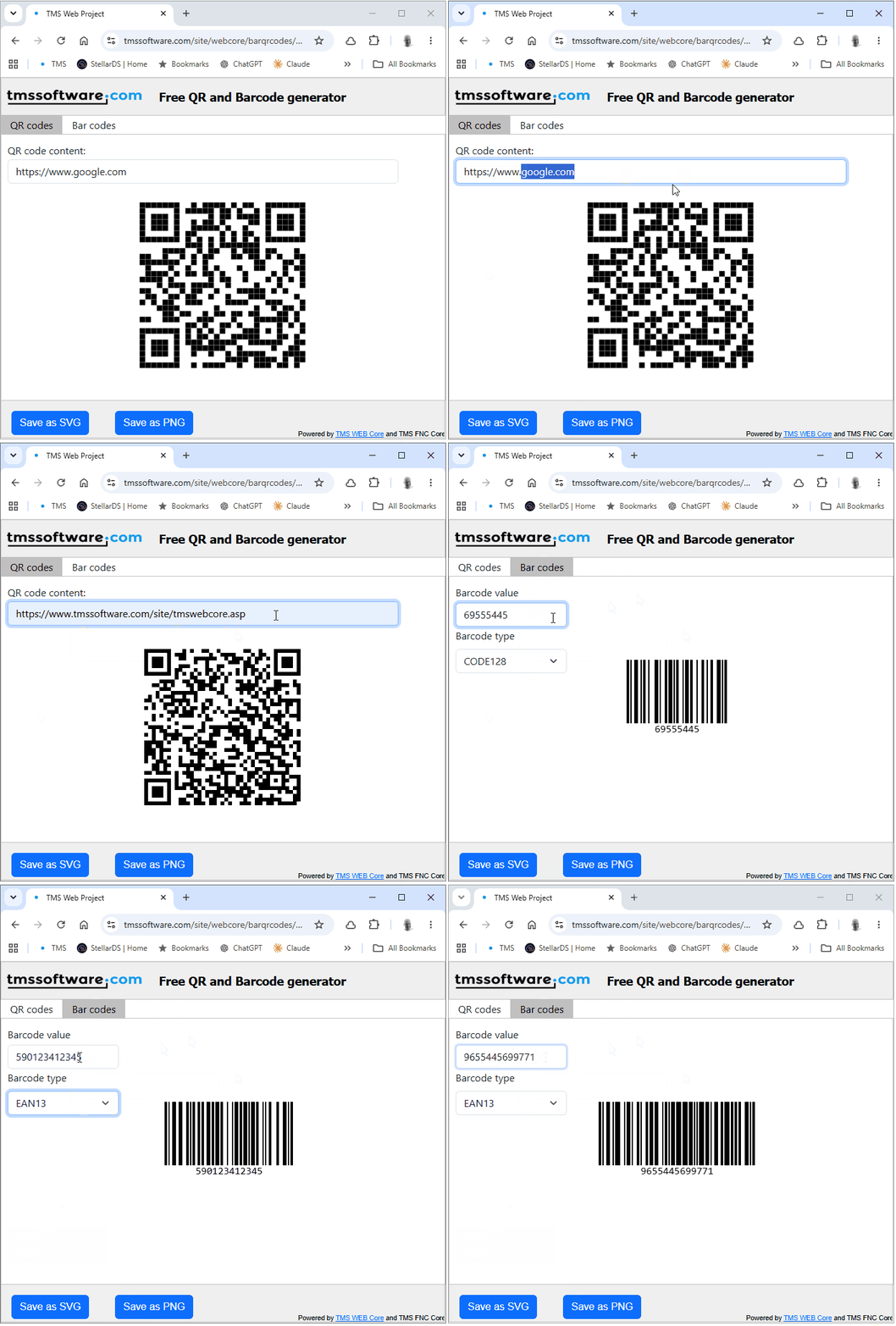
This is not a mock-up. It is a real TMS WEB Core application using the FNC-based barcode and QR code components in the browser. The demo does not rely on elaborate setup code. It starts a standard web form and lets the components do the work.
The main form, implemented in FNC\Demo\Umainform.pas, contains:
- a page control with separate QR code and barcode tabs
- a TTMSFNCQRCode component
- a TTMSFNCBarCode component
- text input controls for QR and barcode content
- a combobox for selecting barcode symbologies
- export buttons for SVG and PNG
The QR code tab exposes free text entry and live rendering, while the barcode tab exposes both a value field and a barcode type selector.
Demo Code: Direct And Practical
The QR code update path is intentionally straightforward:
procedure TForm1.WebEdit1Change(Sender: TObject);
begin
  TMSFNCQRCode1.Text := WebEdit1.Text;
end;
As the user edits the text, the QR code component updates immediately. That is the kind of direct event-driven programming model Delphi developers expect, and the browser deployment preserves it.
The barcode side follows the same pattern:
procedure TForm1.WebEdit2Change(Sender: TObject);
begin
  TMSFNCBarCode1.Value := WebEdit2.Text;
end;
Here too, the component API stays simple. A value property is assigned, and the visual result updates accordingly.
Barcode type selection
The demo also contains a small but useful layer around barcode type selection. A local enum lists the supported barcode types, and the form populates the combobox at startup:
procedure TForm1.WebFormCreate(Sender: TObject);
var
  BarcodeType: TTMSBarcodeType;
begin
  for BarcodeType := Low(TTMSBarcodeType) to High(TTMSBarcodeType) do
    WebComboBox1.Items.Add(TMSBarcodeTypeName(BarcodeType));

  WebComboBox1.ItemIndex := 1;
  WebPageControl1.ActivePageIndex := 0;
end;
When the selection changes, the demo assigns a format-appropriate sample value:
procedure TForm1.WebComboBox1Change(Sender: TObject);
var
  BarcodeType: TTMSBarcodeType;
begin
  BarcodeType := TTMSBarcodeType(WebComboBox1.ItemIndex);
  TMSFNCBarCode1.Value := SampleValue(BarcodeType);
  WebEdit2.Text := TMSFNCBarCode1.Value;
end;
Barcode formats can be slighly different for different barcode types. So supplying a valid sample content per barcode type makes the demo more useful.
Export To SVG And PNG
The export story is another strong point because it shows that the component is not limited to on-screen rendering. The demo exposes both SVG and PNG export from the same form.
SVG export:
procedure TForm1.WebButton1Click(Sender: TObject);
begin
  if WebPageControl1.ActivePageIndex = 0 then
    TMSFNCQRCode1.SaveToSVG('qrcode.svg');

  if WebPageControl1.ActivePageIndex = 1 then
    TMSFNCBarCode1.SaveToSVG('barcode.svg');
end;
PNG export:
procedure TForm1.WebButton2Click(Sender: TObject);
begin
  if WebPageControl1.ActivePageIndex = 0 then
    TMSFNCQRCode1.SaveToPNG('qrcode.png');

  if WebPageControl1.ActivePageIndex = 1 then
    TMSFNCBarCode1.SaveToPNG('barcode.png');
end;
One Technical Investment, Many Targets
The broader point of the FNC implementation is clear. By coding against TMS FNC Core, the library is no longer boxed into a VCL-only story. The same underlying implementation can be surfaced in:
- classic Windows desktop applications
- cross-platform FireMonkey desktop applications
- native FireMonkey mobile applications
- browser-based TMS WEB Core applications
That is a strong technical result with a clear business benefit. You invest in one code base, one API style, and one component model, then reuse it across the places where your users actually are.
If you want to inspect the code, the GitHub repository is here:
If you want to see it running immediately, try the hosted demo here:
We hope you enjoy integrating QR and bar code creation in your Delphi apps, be it VCL apps, FireMonkey cross-platform apps or web client applications created with TMS WEB Core. We are eager to learn what other libraries you want to have available in the FNC concept. Let us know and we'll investigate.
Bruno Fierens

This blog post has not received any comments yet.
All Blog Posts | Next Post | Previous Post