Blog
All Blog Posts | Next Post | Previous Post

 Free native Barcode & QR Code Generation in VCL Applications
Wednesday, June 17, 2026
Barcodes and QR codes are everywhere: product labels, invoices, tickets, warehouse apps, mobile links, asset tracking and more. With Bar&QRCodes4D, Delphi developers can add this functionality directly to VCL applications with native Delphi code.
The open-source library is available on GitHub:
It contains native barcode and QR code generator components for Delphi VCL applications, including sample projects for barcode and QR code generation.
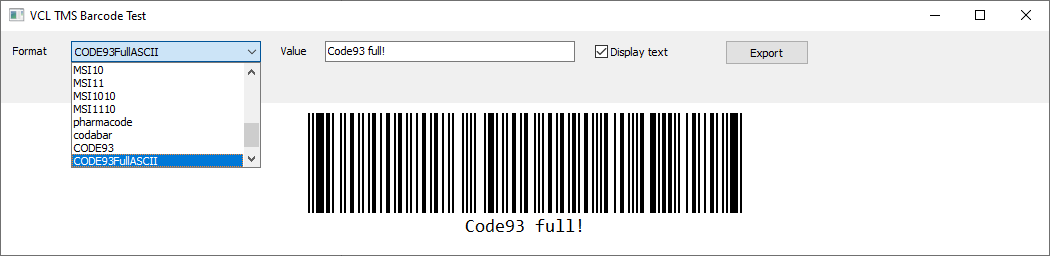
For Code 39:
The barcode appearance can be customized with properties such as bar color, background color, module width, margins and text display.
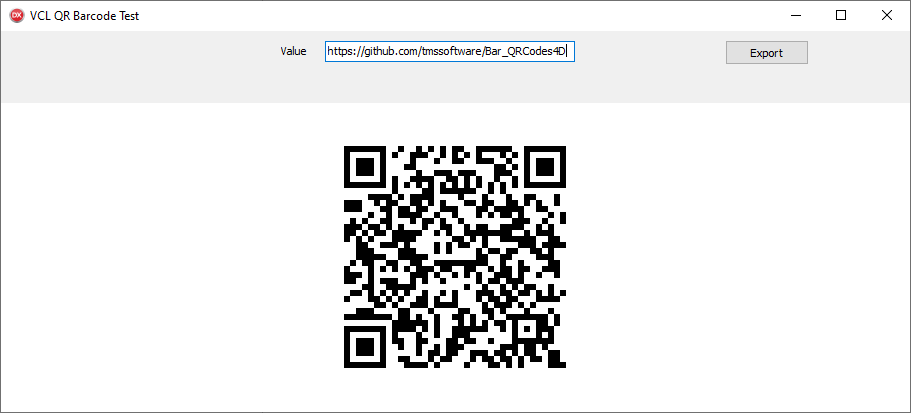
Adding a Barcode Component
After installing or adding the units to your project, barcode generation starts with the TTMSBarCode component.
uses
  TMSBarCode;

procedure TForm1.FormCreate(Sender: TObject);
begin
  TMSBarCode1.BarcodeType := tbcCODE128;
  TMSBarCode1.Value := 'TMS-123456789';
end;
The component renders the barcode directly in the VCL form.
Choosing the Barcode Type
The barcode component supports several common barcode formats. For example, to generate an EAN-13 barcode:
procedure TForm1.GenerateEAN13;
begin
  TMSBarCode1.BarcodeType := tbcEAN13;
  TMSBarCode1.Value := '5412345678908';
end;
procedure TForm1.GenerateCode39;
begin
  TMSBarCode1.BarcodeType := tbcCODE39;
  TMSBarCode1.Value := 'TMSCODE39';
end;
For Interleaved 2 of 5:
procedure TForm1.GenerateITF;
begin
  TMSBarCode1.BarcodeType := tbcITF;
  TMSBarCode1.Value := '1234567890';
end;
Customizing the Barcode
The barcode appearance can be customized with properties such as bar color, background color, module width, margins and text display.
procedure TForm1.SetupBarcodeStyle;
begin
  TMSBarCode1.BarColor := clBlack;
  TMSBarCode1.BackgroundColor := clWhite;
  TMSBarCode1.ModuleWidth := 2;
  TMSBarCode1.BarHeight := 100;
  TMSBarCode1.Margin := 10;
  TMSBarCode1.DisplayValue := True;
end;
This makes it easy to adapt the barcode output for screen display, label printing or report generation.
Checking for Encoding Errors
When generating barcodes dynamically, it is useful to validate the value before printing or exporting.
procedure TForm1.ValidateBarcode;
var
  LPattern: string;
  LText: string;
begin
  if TMSBarCode1.TryEncode(LPattern, LText) then
    ShowMessage('Barcode generated successfully')
  else
    ShowMessage(TMSBarCode1.LastError);
end;
This is especially helpful when using barcode formats that require numeric input or fixed-length values.
Exporting a Barcode to PNG
Barcodes can also be exported to image files.
procedure TForm1.SaveBarcodeAsPNG;
begin
  TMSBarCode1.SaveToPNG('c:\temp\barcode.png');
end;
Exporting a Barcode to SVG
For high-quality scalable output, SVG export is also available.
procedure TForm1.SaveBarcodeAsSVG;
begin
  TMSBarCode1.SaveToSVG('c:\temp\barcode.svg');
end;
SVG export is particularly useful for printing, label design and integration with document workflows.
Generating QR Codes
QR code generation is just as straightforward with the QR code component.
uses
  TMSQRCode;

procedure TForm1.FormCreate(Sender: TObject);
begin
  TMSQRCode1.Value := 'https://www.tmssoftware.com';
end;
This instantly creates a QR code that can be scanned with a phone camera.
Generating a QR Code from User Input
A common scenario is generating a QR code from a value entered by the user.
procedure TForm1.ButtonGenerateClick(Sender: TObject);
begin
  TMSQRCode1.Value := EditQRCodeText.Text;
end;
This can be used for URLs, contact details, product IDs, internal references or any other text value.
Exporting a QR Code
QR codes can also be exported to PNG or SVG.
procedure TForm1.SaveQRCode;
begin
  TMSQRCode1.SaveToPNG('c:\temp\qrcode.png');
  TMSQRCode1.SaveToSVG('c:\temp\qrcode.svg');
end;
Printing from VCL
Because the components render natively, they can be used in normal VCL printing workflows.
uses
  Vcl.Printers;

procedure TForm1.PrintBarcode;
begin
  Printer.BeginDoc;
  try
    TMSBarCode1.PaintTo(Printer.Canvas.Handle, 100, 100);
  finally
    Printer.EndDoc;
  end;
end;
This keeps barcode generation fully inside the Delphi application, without external tools or online services.
Why Native Delphi Code Matters
Using a native Delphi barcode and QR code library has several advantages:
• no external DLL deployment
• no server-side generation required
• no internet dependency
• full Delphi source availability
• easy integration in existing VCL projects
• direct PNG and SVG export
For applications that need reliable local code generation, this keeps deployment simple and predictable.
Conclusion
Bar&QRCodes4D brings native barcode and QR code generation to Delphi VCL applications in a clean and practical way. With support for common barcode formats, QR code rendering and export to PNG and SVG, it is a useful open-source library for adding machine-readable codes to business applications.
The full source code and demo projects are available on GitHub:

https://github.com/tmssoftware/Bar_QRCodes4D
https://github.com/tmssoftware/Bar_QRCodes4D
Bruno Fierens

This blog post has received 2 comments.
 2. Friday, June 19, 2026 at 5:49:00 PM
MIT
2. Friday, June 19, 2026 at 5:49:00 PM
MITgood remark, I added licensing info to the github repo
Bruno Fierens
All Blog Posts | Next Post | Previous Post
Ian Barker