Blog
All Blog Posts | Next Post | Previous Post

 Announcing SmartSetup 3.0... and 3.1... and 3.2... and 3.3!
Saturday, April 18, 2026
Time flies when you are having fun. We have been so busy lately adding new stuff to SmartSetup that we haven't had enough time to tell you about everything that's new. So, in this post, we wanted to give you a recap of the main new features.
Versioning
In SmartSetup 3.0 we added versioning. This means that you can now install older versions of our components (and components from the community server) just by right-clicking them in tmsgui and selecting a version.
Because SmartSetup was designed from the start to support versioning, this change is retroactive across all versions of TMS components ever published with SmartSetup. So even though we only released versioning support a month ago, you can get a component from a year ago without issues.
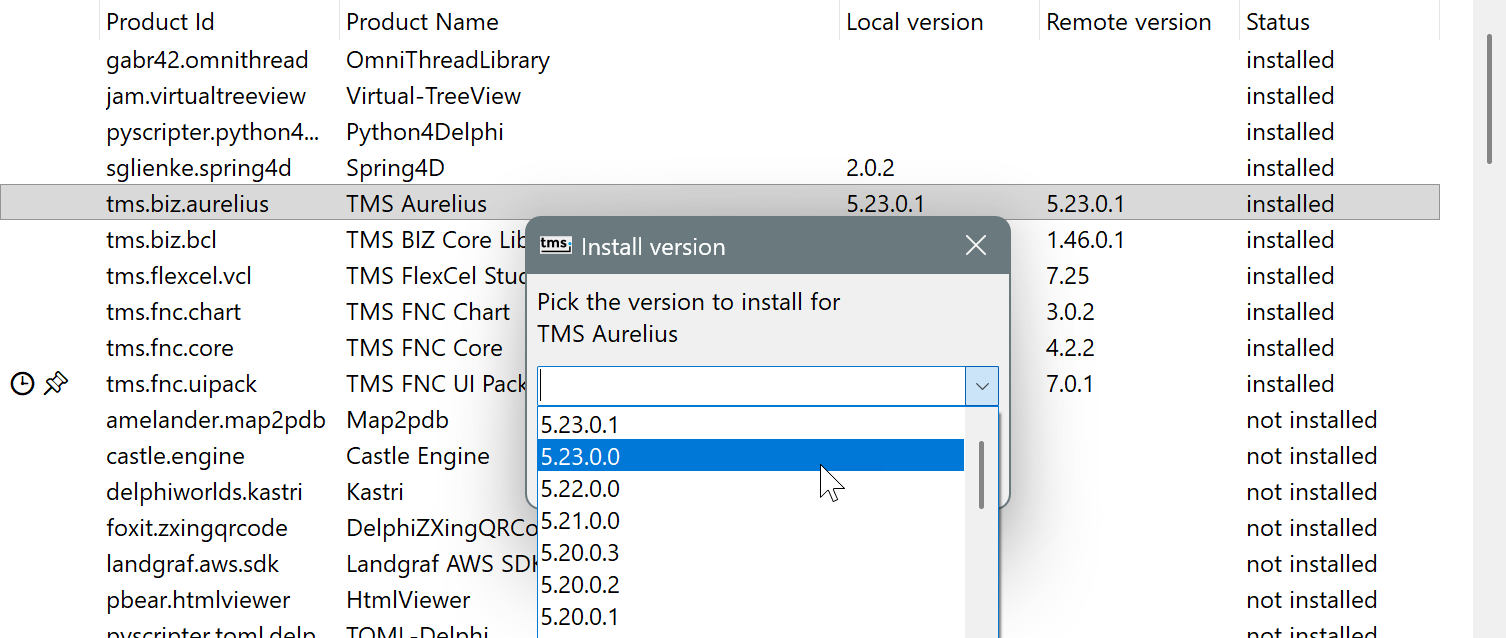
For open-source components in Git, you can get any tagged version in the repository (shown here in dark mode, so we can also show off another great feature in SmartSetup 3.0):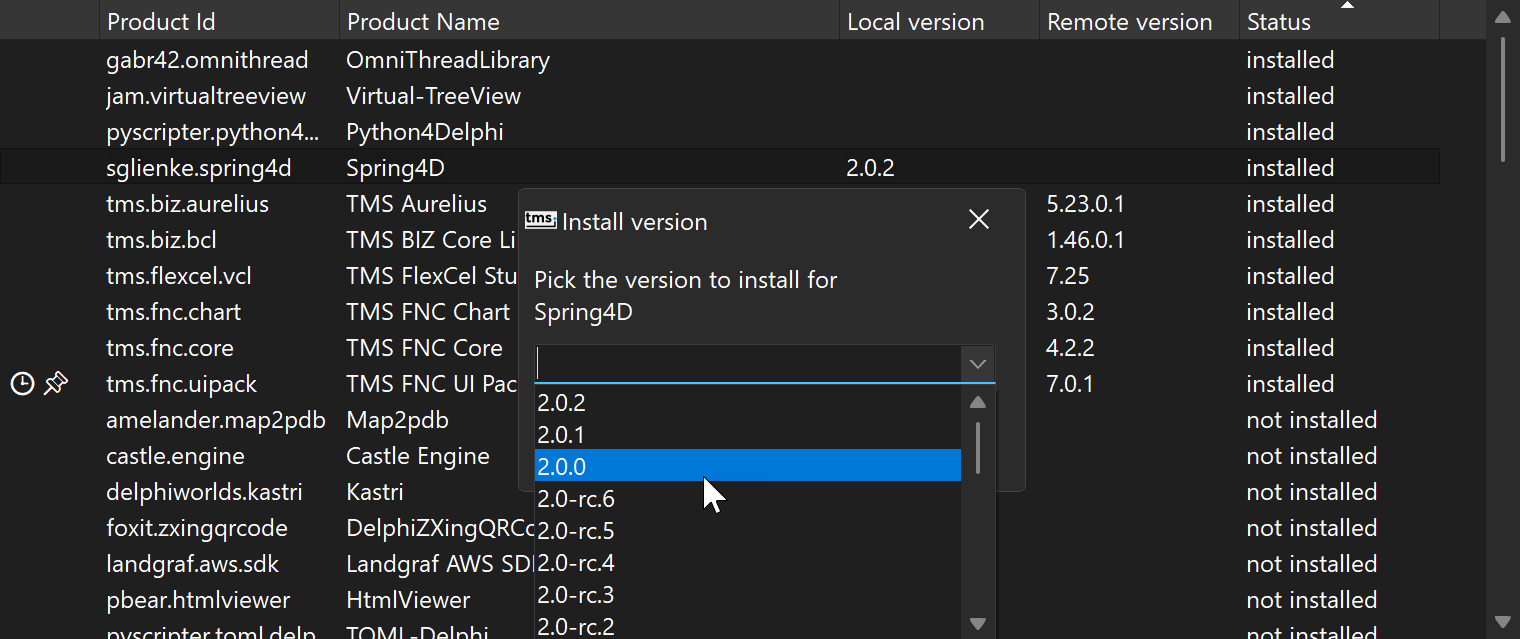
This is, of course, also supported from the command line.
Note: versioning is not yet supported in tms dashboard. Until that support is added, you'll need tmsgui or tms directly to work with older versions.
Besides adding the much-requested support for older versions, SmartSetup 3.0 added the following features to make it simpler to work with versions:
- Snapshots: These work like a lock file in other package managers. They let you record the exact components and versions you are using at any given moment. You can generate snapshots automatically and store them in git, so if you want to roll a project back a year — including the component versions you were using then — you can simply restore the snapshot saved at that time. Snapshots also make it easy to reproduce the same environment across multiple machines.
- Version Pinning: You can now pin individual components, so they don't update automatically when you run an update. You can also pin all components, if you want to be sure nothing updates until you manually unpin them. As usual, this works with both TMS and non-TMS components. If you look back at the images at the beginning of this post, you can see that tms.fnc.uipack is pinned, in the leftmost column of the grid.
- MultIDE: There is a new tool available at https://github.com/agallero/multide that makes it simpler to have multiple versions of components installed on the same machine at the same time. I personally use it a lot to test different setups for customers.
Windows on ARM Support
In version 3.1, SmartSetup added support for the new Windows on ARM platform, just days after it was introduced in RAD Studio. We did find the time to write about that one, so for more information see https://www.tmssoftware.com/site/blog.asp?post=2468
SBOM
Version 3.2 added a sbom-generate command that can produce a CycloneDX SBOM for every installed component, using the knowledge SmartSetup already has about dependencies and versions. The idea is not to replace an application-wide SBOM tool, but to feed it accurate component-level information that the app can use to generate the bigger SBOM for your application. If you are doing a SBOM application and think you can use the information SmartSetup can generate, do not hesitate to contact us.
SBOM is still a moving target, so expect changes in this area as the exact requirements become clearer. We plan to blog about more specific SBOM stuff in the future.
We would like to specially thank Björn Mänken for contributing the SBOM-generating code.
Automated Builds
In release 3.3 we added many improvements for running automated builds on a server, along with a document with information about how to set it up. SmartSetup was originally created as a builder, and we have been using it that way for years. Fun fact: the original command-line project was called "tmsbuild", as a word play on "msbuild". When we added more commands, we renamed it to "tms" to avoid having to type "tmsbuild build" — so you can still write "tms build", just with an extra space. But from the beginning, SmartSetup has been a builder, as you can infer from its original name.
In 3.3 we documented a lot more on how SmartSetup can be used to build your projects, not just install components. We also fixed many small things and added quality-of-life features to make the process smoother. We hope it helps speed up your build systems as much as it has ours. For complex projects, the parallel compilation in SmartSetup can shave literal hours off build times. In my own case, a build of FlexCel (the components themselves, plus more than 60 demos, tools, etc., built for Delphi XE through Delphi 13 on every platform) used to take about 8 hours. The new SmartSetup-based builder does the same work in 45 minutes. The speed gains are real.
And a lot more
You can find a full list of the smaller changes at https://doc.tmssoftware.com/smartsetup/guide/release-notes.html. Things like much-improved installs in Delphi Community Edition, or credentials now being stored securely in the Windows Credential Manager. From an improved tms doctor that can find and fix more misconfigurations, to a new tms spec command that makes creating SmartSetup spec files much easier. From a new Dark Mode in tmsgui to greatly improved documentation. And so on.
Finally, let us once more remind you that SmartSetup is fully open source, and you can find the repository at https://github.com/tmssoftware/smartsetup. Feel free to open issues if you run into trouble or are missing functionality. All contributions are welcome, from improving the docs to bug fixes and new features. And if you find SmartSetup as useful as we do, don't forget to give it a star! Help us make SmartSetup great for the whole Delphi community.
Adrian Gallero
Related Blog Posts
-
TMS Smart Setup is now Open Source!
-
TMS Smart Setup 2.0 — A Major Leap Forward for Delphi Developers
-
TMS Smart Setup v3.1 brings Delphi 13.1 Arm64EC support to TMS products—and raises the bar for the Delphi ecosystem
-
Announcing SmartSetup 3.0... and 3.1... and 3.2... and 3.3!
-
TMS Dashboard updated with TMS Smart Setup v3.3 support
-
TMS VCL UI Pack: Installation, Modernized
-
TMS FNC Family Updated with a New Install Experience

This blog post has received 2 comments.
2. Thursday, April 23, 2026 at 9:02:04 AM
Thanks for the kind words! Sincerely appreciated, we love to hear it is being useful :)
Adrian Gallero
All Blog Posts | Next Post | Previous Post
Erne H.