Install Error Messages
On this page, we have bundled the most frequently encountered issues with installing 3rd party components in general in Delphi or C++Builder. This applies to TMS components as well as to any 3rd party VCL component. The issues typically originate from an incorrect IDE setup. We hope this will be valuable information to quickly trace & solve the most common issues & mistakes with installing components.
General error messages
1. Error: Class...not found (when opening a project)
Please make sure ALL packages that are used for the component for which the error appears are installed & active. See menu Component, Install Packages in the IDE.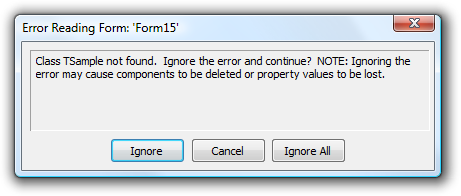
2. Error: File not found xxxx.dcu
Please make sure to set your Delphi library path correct that it includes the folder where these DCU files are located. The library path can be configured under menu Tools, Options, Library - Win32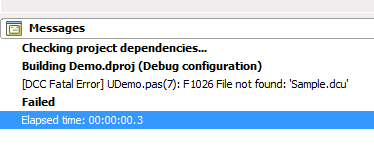
3. Error: Property ... does not exist
Before installing component updates, make sure that ALL old version files (DCU, BPL, BPI, LIB, DCP, HPP, OBJ .. files) are removed from your Delphi or C++Builder library path. After installing new component versions and compiling applications that have been build with previous component versions, property errors can be raised upon running the applications. This is a common Delphi or C++Builder phenomenon. Solve this by first opening ALL forms in the application that use the updated component, ignore ALL property errors upon opening the forms, save the form files and after this, rebuild the application. The problem will be solved.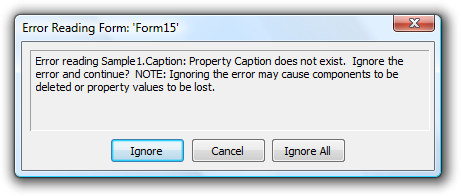
4. Error: Could not compile used unit 'xxxx.pas'
Before installing component updates, make sure that ALL old version files (DCU, BPL, BPI, LIB, DCP, HPP, OBJ .. files) are removed from your Delphi or C++Builder library path.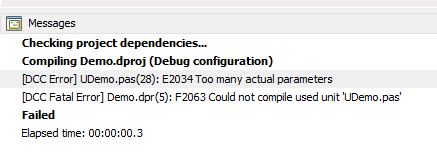
5. Error: Can't load package ... .bpl
Add the folder where the package .BPL files are located to your system path. See Control Panel, System, Advanced Settings, Environment for editing the system path.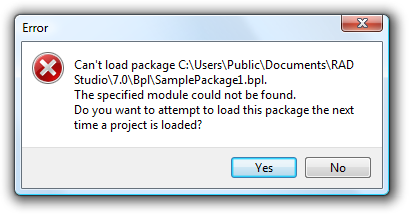
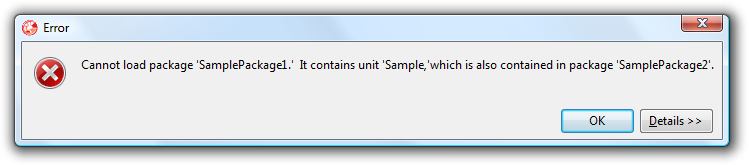
6. Error: Cannot load package 'x'. It contains unit 'y', which is also contained in package 'z'.
In Delphi & C++Builder, a unit can be used in one package only. This error happens when you try to install two or more packages that use the same unit. To solve this, remove the unit(s) that is/are used in multiple packages from the package files (choose Remove from Project Manager). Then, from the IDE create a new package and add the unit(s) to this new package and compile this package. Then, in the packages where the unit was used, add a reference in the Requires list of the package to this new compiled package (.DCP file in Delphi / .BPI file in C++Builder) that contains the unit(s).More information about installing TMS Components with shared units can also be found here: https://www.tmssoftware.com/site/instcommon.asp
7. Error: procedure entry point could not be found
When errors are raised upon running the applications such as "procedure @... or the procedure entry point @... could not be located", make sure to scan your hard disk for ALL old versions of package .BPL, package .DCP (package .LIB in C++Builder) files and delete ALL old versions. This error can appear when a project is built with a different version .DCP or .LIB file than the version that is loaded at runtime.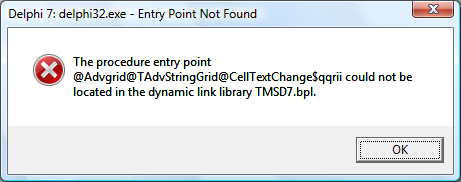
8. Error: Ambiguity between 'xxxx' and 'unit::xxxx
In Delphi or C++Builder, constants with the same name but declared in different units can be used simultaneously. For example, the constant psOffice2003Blue is declared in both AdvPanel.pas & AdvOfficePagerStylers.pas. To use these constants in an application that uses both units, prefix the constant with its namespace, ie:For a TAdvPanel style, use AdvPanel.psOffice2003Blue and for a TAdvOfficePager style use AdvOfficePagerStylers.psOffice2003Blue
9. Error: Activation file has been created ....\TMSPCKLIC.act. Please exit setup and activate your software
When errors are raised upon entering your registration email and code in the setup.exe such as "Activation file has been created ....\TMSPCKLIC.act Please exit setup and activate your software", make sure that an internet connection is available on your machine and that no firewall or antivirus software is blocking internet access for SETUP.EXE. When this issue ensured, delete the .ACT file and restart the SETUP.10. Error: [DCC Fatal Error] advgrid.pas(488): F1026 File not found: "Windows.dcu"
When errors are raised upon installing the package tmsDXE2.bpl such as: [DCC Fatal Error] advgrid.pas(488): F1026 File not found: "Windows.dcu", make sure that your unit scope names are setup correct in your IDE, project & packages. See: http://docwiki.embarcadero.com/RADStudio/en/Unit_Scope_NamesFor VCL UI Pack, unit scope names should be:
Data.Win;Datasnap.Win;Web.Win;Soap.Win;Xml.Win;Bde;Vcl;Vcl.Imaging;Vcl.Touch;Vcl.Samples;Vcl.Shell;System;Xml;Data;Datasnap;Web;Soap;Winapi;System.Win
11. Error: Unknown Parent namespace:embarcadero.rs_XXXX Insufficient permissions to complete action
When installing TMS help files and following error appears: "Unknown Parent namespace:embarcadero.rs_XXXX Insufficient permissions to complete action" or "Unknown Parent namespace:embarcadero.rs_XXXX Parent NameSpace: embarcadero.rs_XXXX not registered"This indicates that the default help system in RAD Studio can't be found.
Can you make sure that:
1) The default help system in your IDE is installed & working
2) You execute the command RegHelp2.exe with the same user account as the user account with which you installed Delphi or execute it with admin privileges.
12. Error: function HTMLDrawEx(Canvas:TCanvas; s:string; fr:TRect; FImages: TCustomImageList;
[Error] HTMLENGO.PAS(406): Undeclared identifier: "TCustomImageList"
If you use our HTML engine outside our components, you should add the unit ImgList to the uses list where this was used.
Error messages in C++Builder
1. Error: [BCC32 Error] Uxtheme.hpp(37) E2257, expected
When errors are raised upon installing the package tmsc2010.bpl such as "[BCC32 Error] Uxtheme.hpp(37): E2257, expected", make sure to delete the uxtheme.h file in the TMS VCL UI Pack source folder and recompile. This file is required for older C++Builder versions but not anymore in C++Builder 2010. The same goes for dwmapi.hpp.2. Error: [Linker fatal error] Unable to open file "xxxx.LIB"
When errors are raised upon compiling such as "Error: [Linker fatal error] Unable to open file 'xxxx.LIB'", make sure that xxxx.LIB is linked, you can force this with adding in the project source:#pragma link "xxxx.lib"
Errors during installation with the automatic installer
If there is an issue on your machine during installation with the automatic installer, set Logging = true and send the install.log file that should have been generated under "\My documents" for investigation.1. Error: tmsdXXXX.dpk(165) Fatal: E2202 Required package 'vcl' not found OR tmsdXXXX.dpk(165) Fatal: E2202 Required package 'rtl' not found
This means that your Delphi library path is not properly setup. Please make sure that the folder is included in your library path where vcl.dcp is located, this normally is $(BDS)\libFor multi-platform supported Delphi versions, please have a look at http://codeverge.com/embarcadero.delphi.ide/delphi-xe4-library-path-delete-invalid/1062669
2. Error: E2038 Illegal character in input file:
asgreg.pas(2) Error: E2038 Illegal character in input file: '`' (#$60)
asgreg.pas(2) Error: E2038 Illegal character in input file: '\' (#$5C)
This means that there was an issue with the activation of the software.
Please make sure that when you run the installer, that there is no software such as firewall / antivirus / proxy interfering with the internet connection via HTTP port 80 to http://www.tmssoftware.biz/ that the installer needs.
Please turn-off any such software and retry the install.
3. Error: C:\Program Files\Embarcadero\RAD Studio\8.0\bin\dcc32.exe cannot be found.
Normally, for a properly installed & non trial version of RAD Studio XE, the command line compiler DCC32.EXE should be available. If you have a trial version of RAD Studio XE, it is a known limitation of RAD Studio XE trial itself that the automatic installer will not work. To install for the RAD Studio XE trial , please do this manually from the IDE following the steps in INSTALL.TXT.4. Error: xlsadapter\tmsXlsMessages.pas(8) Fatal: Could not compile used unit 'xlsadapter\tmsUFlxMessages.pas'.
This means that you have not installed all Delphi 6 update packs, including the last RTL update. Please make sure to first install all Delphi 6 update packs and then install TMS VCL UI Pack.5. When installing the package TMS Scripter and following error appears: ascriptproXXXX.dpk(32) Fatal: E2202 Required package 'tmsdXXXX' not found.
This means that TMS VCL UI Pack is not properly installed in your Delphi. The TMS Scripter Installer has detected the package registered in your Delphi, but could not find "tmsdXXXX" package file, required to compile Scripter Studio.6. Error: tmsdXXXX.dpk(607) Fatal: F2039 Could not create output file 'tmsdXXXX.drf'
This means that the user account executing the installer has no write permissions for the folder where the components are installed. Please verify this and choose a folder with no write limitations.7. Error: This version of the product does not support command line compiling
This means you're using a trial version of Delphi and it is a limitation of the Delphi trial version that it doesn't support command line compiling. Please install this on the full version of Delphi or do a manual install following the instructions in INSTALL.TXT8. Error: E2161 Error: RLINK32: Unsupported 16bit resource in file "...\tmssoftware\TMS VCL UI Pack\xxxx.res"
This would hint at a failed activation of the software. Please retry to install, make sure there is no antivirus, firewall, other security tools that interfere with the internet connection our installer needs to activate the software.9. C:\Windows>CALL MSBuild /target:Build /p:config=Debug /p:platform=Win32 /p:DCC_DcuOutput="\\Mac\Home\Documents\tmssoftware\... MSBUILD : error MSB1009: Project file does not exist.
Installing from a network folder isn't supported. This is a shortcoming in MSBUILD. Please run the installer at least from a network drive.Q: "C:\Program Files (x86)\Embarcadero\Studio\22.0\bin\dcciosarm64.exe" is invalid
A: The error pops up because the platform is not found, if you do not use this platform, please ignore this error message and proceed with the installation.
×
![]()